
 Next: Index
Up: Lecture_04_web
Previous: Lecture_04_web
Next: Index
Up: Lecture_04_web
Previous: Lecture_04_web
 is that it reduces or even eliminates
errors that inevitably creep into pencil and paper calculations.
However, this advantage does come with a price: what was once
a simple task of arranging an expression into a convenient form
is something that has to be negotiated with
MATHEMATICA
.
In fact, there are cases where you cannot even coerce
MATHEMATICA
into
representing an expression the way that you want it.
is that it reduces or even eliminates
errors that inevitably creep into pencil and paper calculations.
However, this advantage does come with a price: what was once
a simple task of arranging an expression into a convenient form
is something that has to be negotiated with
MATHEMATICA
.
In fact, there are cases where you cannot even coerce
MATHEMATICA
into
representing an expression the way that you want it.
A
MATHEMATICA
session often results in very cumbersome expressions.
You can decide to live with them, or use one of
MATHEMATICA
's many
simplification algorithms.
Section 1.4.5
(or Help Browser/The Mathematica Book/A Practical
Introduction/Algebraic Calculations/Advanced Topic: Putting Expressions into Different Forms)
of the
MATHEMATICA
book has a good summary of frequently used
simplification algorithms.
Another method is to identify patterns and replace them with your
own definitions.
MATHEMATICA
has its own internal representation for rational functions (i.e.,
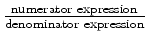 )
and has special operations for dealing with these.
)
and has special operations for dealing with these.
|
MATHEMATICA
Example |
| (notebook Lecture-04) |
| (html Lecture-04) |
| (xml+mathml Lecture-04) |
| Operations on Polynomials
Operations on Rational Expression |
MATHEMATICA
is very fastidious about simplifying roots of numbers.
Unless, it is specified otherwise,
MATHEMATICA
makes no assumptions
about whether a variable is real, complex, positive, or negative.
|
MATHEMATICA
Example |
| (notebook Lecture-04) |
| (html Lecture-04) |
| (xml+mathml Lecture-04) |
|
Simplifying Roots
|
``Deep Blue'' is a program that is very very good at playing chess, perhaps
better than any human.
However, it uses an algorithm that is very different from humans to play.
Analogously,
MATHEMATICA
is very very good at doing calculus--and it too uses algorithms that
would not be useful for most humans.
Nevertheless, it is nice to have a partner who can integrate, differentiate, and
perform Taylor expansions on anything that you
can--and also quickly and accurately.
|
MATHEMATICA
Example |
| (notebook Lecture-04) |
| (html Lecture-04) |
| (xml+mathml Lecture-04) |
|
Calculus: Limits, Derivatives, Integrals
Calculus: Series expansions about a value |
MATHEMATICA
solves equations and, if possible, for each solution gives you rules that you can apply.
It is generally a good idea to name the solution so that you can use it to apply its rules.
This is a powerful aspect of
MATHEMATICA
: it allows you to tackle solutions that would be very
onerous otherwise.
|
MATHEMATICA
Example |
| (notebook Lecture-04) |
| (html Lecture-04) |
| (xml+mathml Lecture-04) |
|
Solving Equations
|
Sometimes, no closed form solution is possible.
MATHEMATICA
will try to give you rules (in perhaps a very strange form) but it
really means that you don't have a solution to work with.
One usually resorts to a numerical technique when no closed form solution is
possible--
MATHEMATICA
has a large number of built-in numerical techniques to help
out.
A numerical solution is an approximation to the actual answer.
Good numerical algorithms can anticipate where numerical errors creep in and
account for them, but it is always a good idea to check a numerical solution to make
sure it approximates the solution the original equation.
Of course, to get a numerical solution, the equation in question must evaluate
to a number.
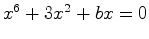
This means if you want to know the numerical approximate solutions  that satisfy
 , you
have to iterate over values of
, you
have to iterate over values of  and ``build up'' your function
one
at a time.
and ``build up'' your function
one
at a time.
Sections 1.6.1-1.6.7
(or Help Browser/The Mathematica Book/A Practical
Introduction/Algebraic Calculations/Numerical Mathematics)
of the
MATHEMATICA
book have an overview of frequently used
numerical algorithms.
|
MATHEMATICA
Example |
| (notebook Lecture-04) |
| (html Lecture-04) |
| (xml+mathml Lecture-04) |
|
Numerical Solutions
|
.
notebook with
a menu.
This is one way to take care of the first two items above.
There are more ways to do this and if you want to do something specialized
like the last two items, then you will have to make
MATHEMATICA
interact with files.
Because an operating system has to allow many different kinds of programs
interact with its files, the internal operations to do input/output (I/O) seem
somewhat more complicated than they should be.
MATHEMATICA
has a few simple ways to do I/O--and it has some more complex ways to
do it as well.
It is useful to have a few working examples that you can modify for your purposes. The examples will serve you well about 90% of the time. For the rest of the 10%, one has to take up the task of learning the guts of I/O--hopefully, beginners can ignore the gory bits.
|
MATHEMATICA
Example |
| (notebook Lecture-04) |
| (html Lecture-04) |
| (xml+mathml Lecture-04) |
| Interacting with files
Using Packages |
There are a number of packages that come with
MATHEMATICA
(and more that can be bought
for special purposes).
You should look through the various packages in the help browser to get an idea of what is
there--it is also a good idea to take a look at the inside of a package by editing
a package file with an editor.
By doing this, you will see some of internal structure of
MATHEMATICA
and
good examples of professional programming.